
You want more customers, so you start advertising on Google.
The phone rings. A few people ask about prices. Someone needs a service you don't provide. Another caller lives farther away than you want to travel.
At the end of the month, you've spent money—but you're still unsure how much work the advertising actually produced.
For a plumber, electrician, HVAC contractor, or other local service business, the goal is to generate inquiries you can turn into worthwhile jobs at a cost your business can support.
Google Local Services Ads, often called LSAs, are one way to reach people searching for local help. But the pay-per-lead model still needs careful setup and ongoing management.
Here's how to approach it.
1Understand Which Google Ads You're Buying
Google offers different advertising options. Two that local service businesses commonly consider are:
Google Search Ads: These typically charge when someone clicks your ad. You manage elements such as keywords, ad copy, and landing pages.
Google Local Services Ads: These charge for valid leads under Google's rules. Customers can contact your business through the ad, with available contact options varying by account and setup.
LSAs can appear prominently when people search for eligible services. They feature business information that helps customers compare providers.
The important distinction: paying for a lead does not mean paying only when a customer hires you.
A person who asks about your prices or researches a future project may still generate a billable lead. You are responsible for converting inquiries into business.
- Google Search Ads — you pay per click and manage keywords, ad copy, and landing pages.
- Google Local Services Ads — you pay for valid leads under Google's rules, with contact options varying by account.
Your first task: identify whether you're running Search Ads, Local Services Ads, or both. Evaluate their spending and results separately.
2Check Eligibility Before Planning Your Launch
Local Services Ads are available for eligible business categories and locations, including plumbing in supported markets.
Check your eligibility through Google's signup process. Complete the required screening and verification steps for your business.
Requirements vary by category and location. They may include business registration, licensing, insurance, background checks, and review requirements. Make sure your Google Business Profile is verified and your business details are accurate.
Google now uses the Google Verified badge for eligible LSA profiles that complete the necessary checks. Older articles may use previous badge names.
Give yourself time to gather documents and respond to requests. A marketing company can help coordinate the process, but Google controls approval.
Your first task: check eligibility and create a list of outstanding verification requirements.
3Decide Which Jobs You Want More Of
Before spending money, write down the work you want to attract.
For a plumber, that might include drain cleaning, water heater replacement, leak repair, or another service the team handles well.
Consider the job's contribution after direct costs, the equipment and skills required, travel time, and your available capacity.
A higher-priced job isn't automatically more profitable. A smaller nearby job may be worthwhile, while a larger job requiring extensive travel and subcontracting may be less attractive.
In your LSA settings, select the available job types that accurately match what you offer. Use supported controls to focus the campaign, while recognizing that they won't perfectly isolate every customer's request.
Avoid selecting services simply because they might generate more calls.
Your first task: list your preferred services and check them against the job types enabled in your account.
4Target Areas You Can Serve Profitably
A large service area can create more opportunities, but it can also create travel problems.
Choose coverage based on how your business actually operates. For a Nassau County plumber, that might mean focusing on communities the team regularly serves before expanding farther away.
Ask yourself:
Review actual lead locations rather than assuming your settings will eliminate every unwanted inquiry.
Don't build a plan around getting refunds for services or locations you don't want. Google says it no longer supports credits for “job type not serviced” and “geo not serviced” leads.
- Can we reliably reach customers in this area?
- Do we want the types of jobs we tend to receive there?
- How does travel affect our schedule and margin?
- Do we have capacity to support additional work?
Your first task: remove coverage you don't genuinely want and review where recent inquiries have come from.
5Set a Test Budget and Understand the Limits
Choose a starting budget you can sustain while gathering useful information.
Don't assume every lead costs the same amount. Lead prices vary with factors such as location, job type, lead type, and bidding mode.
In the traditional LSA interface, Google uses an average weekly budget. Some weeks can exceed that average, subject to the monthly maximum.
For example, an unchanged average weekly budget of $200 corresponds to a monthly maximum of approximately $869, using Google's formula of weekly budget × 30.4 ÷ 7.
Changing the budget during the month changes the remaining spending allowance, so review the effect before saving an adjustment.
Google is also transitioning eligible advertisers to Performance Max campaigns with pay-per-lead goals. Your account may use different screens or controls during this transition. Confirm the budget and billing settings shown in your actual account.
Your first task: write down your test budget, current spending limit, and date for reviewing performance.
6Choose Bidding With Your Business Goal in Mind
Review the bidding options available in your account.
For traditional LSAs, Google recommends “Maximize Leads,” which lets it set bids to seek more leads within your budget. Other options may be available depending on the account.
Whatever you choose, automated bidding doesn't know whether a job ultimately worked well for your business unless you measure the outcome.
More inquiries can be useful, but they also require staff time and follow-up.
Before increasing bids or budget, ask whether you're getting suitable inquiries and whether your team is converting them.
If the phone is already ringing but appointments aren't being booked, investigate that problem before buying more of the same traffic.
Your first task: confirm your bidding mode and compare lead volume with actual booked work.
7Make Your Profile Worth Choosing
Your ad brings your business into consideration. Your profile helps the customer decide whom to contact.
Check your services, hours, business description, photos, and reviews. Use real images and clear information about what the business does.
Request honest reviews consistently, without incentives or filtering out dissatisfied customers.
Google says LSA ranking considers bids and profile quality, including reviews, images, responsiveness, and relevance to the customer's search.
That means increasing your budget is only one possible adjustment. A stronger profile and better inquiry handling may deserve attention too.
No manager can guarantee a particular position.
Your first task: review your profile as a homeowner comparing you with other providers.
8Have a Plan for Answering Every Inquiry
Before running ads, decide who will answer calls and respond to messages.
For a plumber working on-site, that might be office staff, a suitable answering service, or a properly configured phone assistant.
Check your ad schedule separately from your business hours. Advertise at times when you have a realistic process for handling the resulting inquiries.
Google notes that missed calls can negatively affect responsiveness. Don't assume an unanswered call is automatically free: voicemails, meaningful automated interactions, and follow-up connections can qualify as leads under its billing rules.
Check current account notices as call-charging policies change.
Use a simple intake process:
Then offer a specific action: an assessment, an appointment, or a callback with a clear expectation.
- What service does the customer need?
- Where is the property?
- How urgent is the request?
- Can your business handle it?
- What is the next step?
Your first task: test your call routing and message notifications before increasing spend.
9Review Lead Quality and Billing Regularly
Set aside time each week to inspect new leads.
Record what the customer requested, whether the inquiry fit your services, whether anyone responded, and what happened next.
Where available and appropriate, review call details or recordings to understand recurring issues. Distinguish between an unsuitable inquiry and a suitable customer who wasn't handled well.
For eligible accounts, Google uses automated lead assessment and credits. Review charged, uncharged, and credited leads, and submit accurate feedback through the available tools.
A lead that didn't book is not automatically refundable. Google lists examples that won't be credited, including customers researching prices, canceled bookings, and customers who don't respond to follow-up.
Treat credits as part of billing review, not as the foundation of your strategy.
Your first task: review recent inquiries and identify one recurring issue you can address.
10Track Cost Per Booked Job
Cost per lead is useful, but it doesn't tell the whole story.
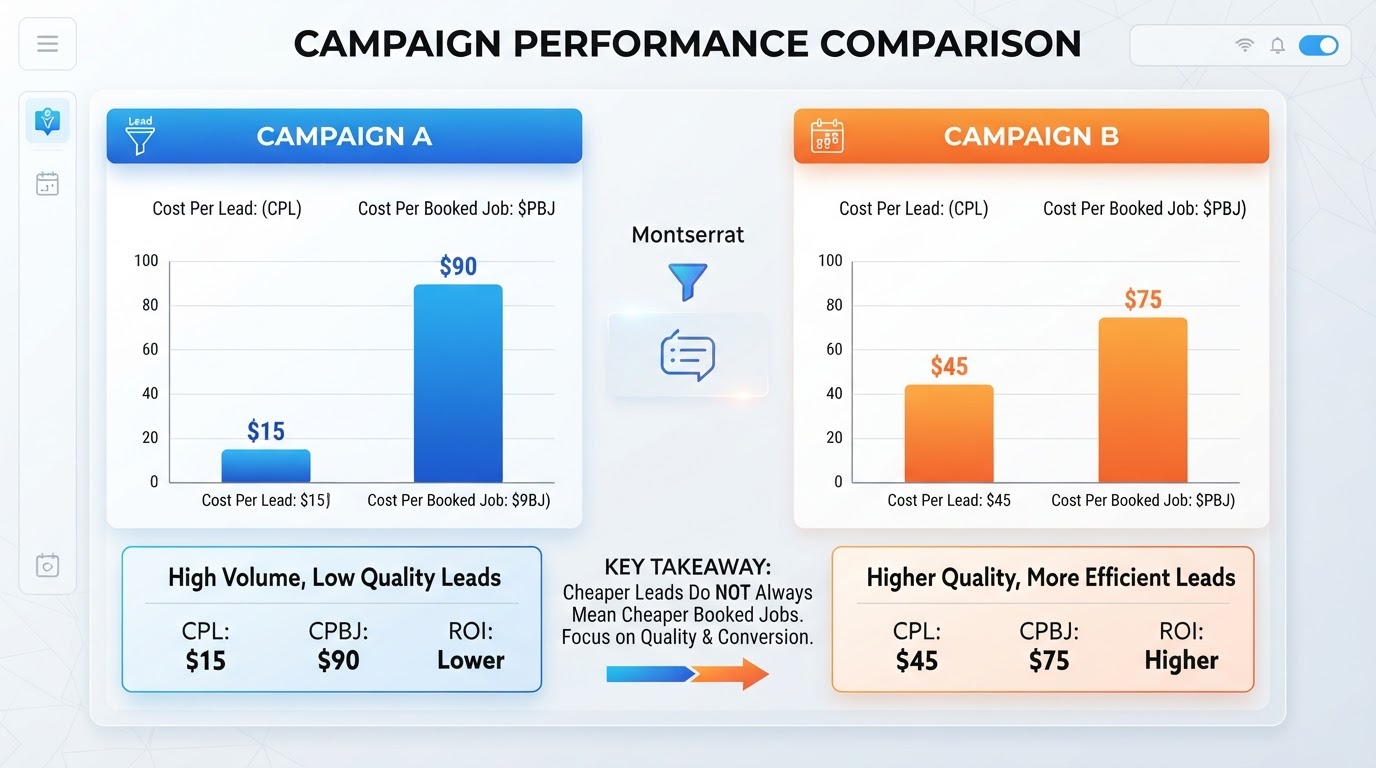
Consider this hypothetical comparison:
Campaign B produces cheaper leads. Campaign A produces booked jobs at a lower advertising cost.
You still need to evaluate cancellations, completed work, revenue, and job profitability. A booking is not the same as a completed, paid job.
Include management fees and other acquisition costs when calculating your total cost. Assess that against the contribution left after direct job costs—not against the full invoice amount alone.
- Campaign A: Ad spend $1,200 — 30 leads — 12 booked jobs — cost per lead $40 — ad cost per booked job $100
- Campaign B: Ad spend $1,200 — 40 leads — 4 booked jobs — cost per lead $30 — ad cost per booked job $300
Your first task: connect each inquiry to its outcome so you can measure spending against real work.
A Simple Management Routine
As leads arrive: Respond promptly, record the request, and establish the next step.
Each week: Review spending, lead quality, unanswered inquiries, booking outcomes, and any account alerts.
Each month: Assess completed jobs and acquisition costs. Review service coverage, capacity, bidding, budget, and profile improvements.
Make changes for a clear reason. Allow enough time to evaluate them, taking account of changes in demand, competition, and your own availability.
Why Setup Alone Isn't Enough
A campaign can be approved and running while still sending inquiries your team struggles to convert.
Services change. Schedules fill up. Documents expire. Google updates its tools and policies.
Good management means noticing those changes and responding to them.
The work includes selecting accurate services and areas, monitoring spending, maintaining the profile, reviewing lead feedback, and connecting inquiries to booked and completed jobs.
Want Us to Manage Your Google Local Services Ads?
At NassauPros, we help local service businesses set up and manage Google Local Services Ads around the work they want to attract.
We can help check eligibility, coordinate verification requirements, review service areas and job types, manage budget and bidding settings, and improve the information customers see in your profile.
Our ongoing management includes reviewing lead quality, monitoring spending and available credits, and helping you understand how inquiries translate into booked work.
We can also help identify gaps in call handling and follow-up that may be limiting results.
You stay focused on serving customers. We handle the campaign oversight and help you make informed advertising decisions.
Contact NassauPros for a Google Local Services Ads assessment. Whether you're starting from scratch or already running ads, we'll review your situation, identify the priorities, and explain how our LSA management service can help.
Editorial Sources
- Google: Understand the screening and verification processhttps://support.google.com/localservices/answer/6226575
- Google: Google Verified announcementhttps://blog.google/products/ads-commerce/google-verified-august-2025/
- Google: How leads workhttps://support.google.com/localservices/answer/7195435
- Google: How to edit your budgethttps://support.google.com/localservices/answer/7434558
- Google: About ad rankingshttps://support.google.com/localservices/answer/7527305
- Google: Automated Local Services Ads lead creditshttps://support.google.com/localservices/answer/15100654
- Google: Manage leads and jobshttps://support.google.com/localservices/answer/6224859
- Google: Performance Max campaigns with pay-per-lead goalshttps://support.google.com/google-ads/answer/17325249