

Your ads report clicks. Your social pages report views. Your Google Business Profile reports activity.
But which of those efforts brought in customers who hired you and paid for the work?
For a plumber, electrician, HVAC contractor, landscaper, or cleaner, that is the question that helps you make better marketing decisions.
You don't need to understand every analytics dashboard to begin. You need a consistent way to connect an inquiry with its source, follow it through the business, and record the outcome.
Here's how to build that process.
1Decide What Counts as a Result
Marketing reports can use the word “conversion” for very different actions.
It might mean a phone-button click, a submitted form, a booked appointment, or a sale. Those actions represent different stages.
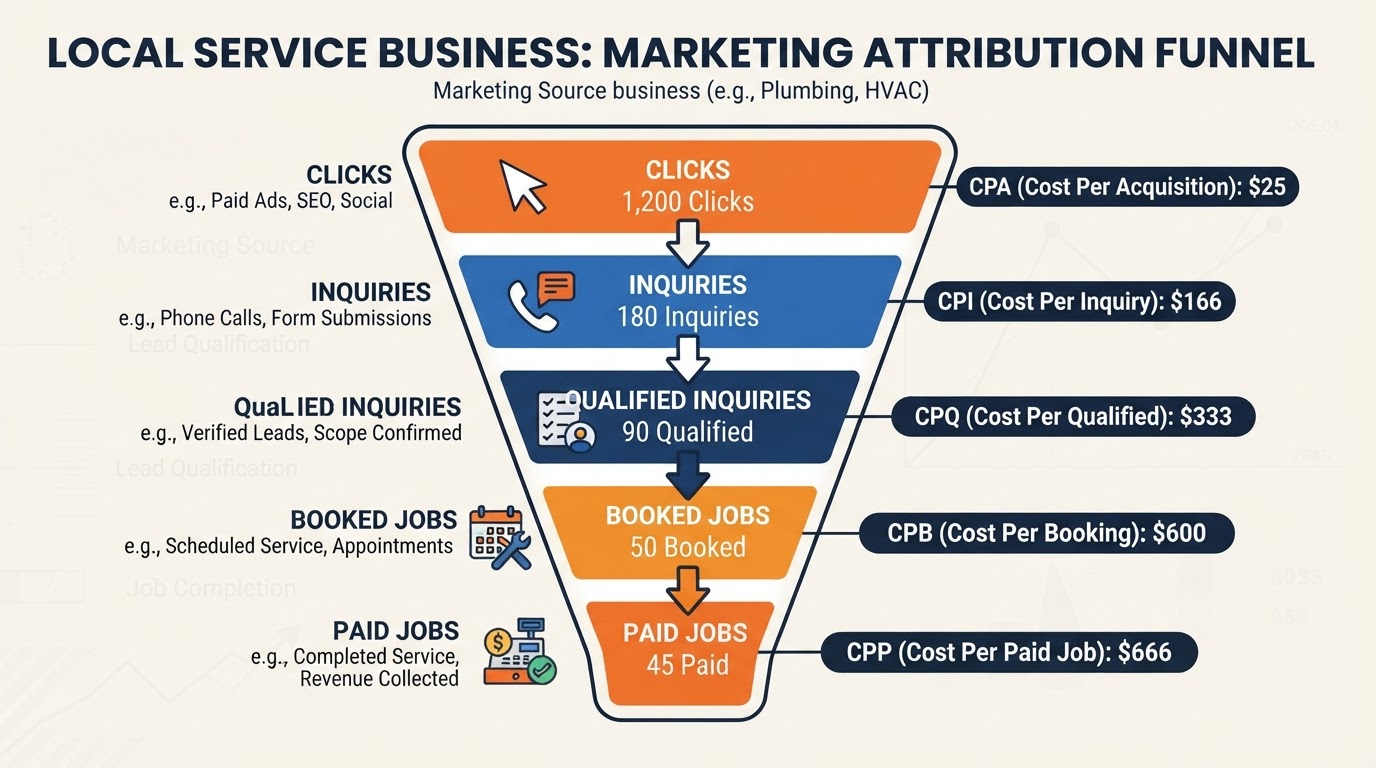
Define the stages you want to measure:
Use definitions that fit your operation. A deposit or partial payment should be recorded accurately rather than treated as a fully paid project.
- Inquiry: Someone contacts your business.
- Qualified inquiry: The request fits your services, coverage, and basic requirements.
- Appointment or assessment: A next step is arranged.
- Booked job: The customer agrees to proceed.
- Completed job: Your team finishes the work.
- Paid job: Payment is received and recorded.
Your first task: agree on these stages with the people who answer calls, schedule work, and manage invoices.
2Give Each Inquiry a Record
A spreadsheet can be enough to start. A CRM can make the process easier as volume grows.
Record:
Use a source list your team understands: Google Search Ads, Google Local Services Ads, unpaid Google search, Google Business Profile, social media, email, referral, returning customer, and unknown.
Keep customer information in an appropriately protected system.
Distinguish a new prospect from an existing customer calling about an active job. Repeated calls from the same person are not necessarily additional leads.
- Inquiry date and customer details
- Service requested
- Service area
- Marketing source
- How the source was identified
- Current stage
- Next action and responsible person
- Job or invoice reference
- Completed-job value
- Amount paid and payment date
Your first task: create a standard inquiry record and assign someone to keep it current.
3Ask How the Customer Found You
Include a short question in your intake process:
“How did you first hear about us?”
If the answer is “Google,” a gentle follow-up may help:
“Do you remember whether you found us in the map listings, through an ad, or on our website?”
Accept that the customer may not know.
Record their answer as customer-reported information. Don't overwrite tracked data just to make the sources agree.
A person might first see your project video, later search for your business, and then call from your profile. Those can all be part of the journey.
If useful, ask:
“Was there anything you saw that helped you decide to contact us?”
Your first task: add the source question to your call script and relevant inquiry forms.
4Use Tracked Links for Campaigns You Control
When you send a customer email or publish a campaign link, you can add tracking labels to the URL. These are commonly called UTM parameters.
They help identify the source, medium, and campaign that referred website traffic.
For example, an email about water heater service could use consistent labels such as:
Use clear naming conventions so the same campaign doesn't appear under several slightly different names.
Google Ads also supports auto-tagging through appropriate integrations. Check the existing setup before adding manual tracking that may create conflicts.
Configure your forms or CRM to preserve source information where supported. A tagged website visit alone doesn't connect itself to a later paid job.
Don't add personal customer details to tracking URLs, and don't use campaign tags on links between pages within your own website.
- Source: customer-email
- Medium: email
- Campaign: water-heater-autumn
Your first task: test one campaign link and confirm that its source appears correctly in your reporting.
5Track Phone Inquiries Appropriately
Phone calls need their own measurement.
Depending on your setup, call tracking may use dedicated numbers for particular channels or website number changes that associate calls with a visitor's source.
A tracking number should route reliably to your business. Test it before launch and preserve access to the numbers your customers rely on.
Coordinate any public listing changes with the person managing your local SEO. Avoid casually replacing numbers across your listings without a plan.
Record whether the call was answered, what the customer needed, and whether it became a qualified inquiry.
Call length can help you review activity, but it doesn't prove the caller hired you.
Google Business Profile's “Calls” metric counts clicks on the call button. It is not a complete record of answered calls or paying customers.
If your setup uses recordings, configure any required notices and appropriate access. Source tracking can also be useful without recording the conversation.
Your first task: confirm what your current phone reporting actually measures.
6Track Forms and AI Conversations as Separate Actions
If someone submits a form, record a successful submission rather than only a button click.
Check that the request reaches the correct inbox or CRM and retains available source details.
An AI assistant conversation needs similar clarity. Distinguish between someone starting the assistant, asking a general question, submitting a service request, and booking an appointment.
These are useful actions, but they don't all represent the same level of intent.
When the same customer calls, submits a form, and uses the assistant, connect those interactions where your records support it. Don't count them as three separate customers.
Where analytics and ad-platform tags are used, configure the appropriate privacy and consent settings. Don't place private customer information in ordinary analytics event labels or page URLs.
Your first task: submit a test form and service request, then check the resulting records.
7Connect the Lead Record to the Job and Payment
This is the step that makes your reporting useful to the business.
When a customer books, attach the appointment or job reference to the inquiry. When you issue an invoice and receive payment, update the record or connect your systems.
Record cancellations, declined estimates, partial payments, refunds, and outstanding balances accurately.
If your CRM and accounting tools aren't connected, a regular manual reconciliation can work. Match records carefully rather than guessing based on similar names.
For supported Google Ads setups, qualified-lead and converted-lead reporting can help connect advertising with later outcomes. Confirm that imported events represent the stage you intend and aren't being duplicated.
You can start with internal records before implementing advanced integrations.
Your first task: trace several recent paid jobs backward to their original inquiries and see where information is missing.
8Compare Cost With Paid Work, Not Just Lead Volume
For each channel or campaign, calculate useful measures:
Cost per inquiry: Marketing cost ÷ inquiries.
Cost per qualified inquiry: Marketing cost ÷ qualified inquiries.
Cost per new paying customer: Marketing cost ÷ new paying customers attributed under your chosen reporting method.
Use separate measures for repeat-customer campaigns. A returning customer is valuable, but is not a newly acquired customer.
Include ad spend, management fees, and other relevant costs. Allocate shared expenses consistently and identify estimates as estimates.
Don't call unpaid search traffic “free” if you pay for SEO, content, or website work.
Also assess job contribution: the amount left after direct job costs. Revenue alone doesn't tell you what the business earned.
Your first task: calculate acquisition cost for one channel using a clearly defined customer group.
9Use a Worked Example to See the Difference
Consider two hypothetical campaigns. Assume all counted customers are new, the tracked jobs are completed and paid, and the listed spending relates to the same reporting group.
Campaign A:
Its ad cost per inquiry is $75.
Its total marketing cost per new paying customer is $180.
The jobs contribute $4,000 after direct costs. Subtracting the $1,800 marketing cost leaves $2,200 before overhead and other expenses.
Campaign B:
Its ad cost per inquiry is approximately $43.
Its total marketing cost per new paying customer is $360.
The jobs contribute $1,500 after direct costs. Subtracting marketing leaves a $300 shortfall before overhead and other expenses.
Campaign B generated cheaper inquiries. In this example, Campaign A produced a better completed-job result.
These figures are illustrative, not benchmarks or predictions. You would also examine capacity, repeat business, and other operating costs.
- Ad spend: $1,500
- Allocated management cost: $300
- Total marketing cost: $1,800
- Inquiries: 20
- Qualified inquiries: 15
- New paying customers: 10
- Paid job revenue: $9,000
- Direct job costs: $5,000
Your first task: build the same comparison using your own records.
10Be Honest About What Attribution Can Tell You
A customer may encounter several channels before contacting you.
For example:
They see a landscaping project on social media, ask a neighbor about your company, search for your name, and call from your Google Business Profile.
Your call record may identify the profile. The customer may credit the neighbor. Social content may still have played a role.
Choose a consistent method for your main report, such as the reliably identified inquiry source, and record additional known influences separately.
Avoid giving every platform full credit for the same sale. Ad platforms may report overlapping results using different attribution windows and rules.
Preserve “unknown” when you don't have enough information. Missing cookies, cross-device activity, manual dialing, and incomplete records can all limit tracking.
Attribution describes the evidence available. It does not prove every reported customer would have been lost without that channel.
Your first task: document how your report assigns credit and what it cannot measure.
Compare the Right Time Periods
An inquiry from September may become a paid installation in October.
If you compare September advertising with only September payments, you may miss its eventual results. If you compare October spending with all October payments, you may include customers acquired earlier.
Where practical, report outcomes for groups of inquiries based on when they arrived, and allow time for those jobs to mature.
Also keep a separate monthly view of spending and cash received for operating decisions.
Compare similar periods and note changes in seasonality, staffing, prices, and campaigns. A small number of jobs can make short-term results look more dramatic than they are.
A monthly review can combine current activity with updated outcomes from earlier inquiries.
Use the Report to Choose Your Next Action
Good reporting should help you identify the problem.
Many inquiries, few suitable requests: Review targeting, service information, and coverage.
Suitable requests, few conversations: Check call handling and response times.
Many estimates, few bookings: Review the estimate process, customer questions, and follow-up.
Plenty of work, weak contribution: Review the job mix, direct costs, pricing, and acquisition cost.
A strong result from a small sample: Gather more evidence before making a large budget change.
An unclear source picture: Improve tracking before drawing a firm conclusion.
Don't cut a channel because of one quiet week or increase spending just because it reports cheap leads.
A Simple Monthly Report
You should be able to see:
Keep business totals separate from platform activity. That makes the report easier to understand and harder to inflate accidentally.
Want Us to Set Up Tracking and Make Sense of the Results?
At NassauPros, we help local service businesses connect marketing activity with customer inquiries and booked work.
We can configure appropriate campaign links, website conversion tracking, call tracking, and CRM lead records. Where your systems and records support it, we can connect those inquiries to completed jobs and payments.
Our reporting explains the difference between clicks, leads, appointments, and paying customers—and highlights the limits of the available data.
If we manage your website, local SEO, social media, or advertising, we use those results to guide the next improvements.
You focus on running the business. We handle the tracking setup and help you understand what the marketing is producing.
Contact NassauPros for a marketing tracking assessment. We'll review your current tools and reports, identify missing connections, and show you how a done-for-you setup could give you a clearer view of results.
Editorial Sources
- Google Analytics: Collect campaign data with custom URLshttps://support.google.com/analytics/answer/10917952
- Google Analytics: Traffic-source dimensions, manual tagging, and auto-tagginghttps://support.google.com/analytics/answer/11242870
- Google Business Profile: Performance and insightshttps://support.google.com/business/answer/9918094
- Google Ads: Qualified leads and converted leadshttps://support.google.com/google-ads/answer/11459091